

In surveying, people sometimes refer to the same point on the earth's surface, but they get different elevations. How is that possible? The reason is because each person measured the same point's elevation through a different elevation reference (or vertical datum).
This article gives an explanation regarding the different elevation references, along with a quick explanation regarding vertical datums and their proper set up.
Overview
- Elevation References
- Mean Sea Level and Local Vertical Datums
- Set the Proper Vertical Datum in the TerrainCreator App
Elevation References
Essentially, we have 3 main categories of elevation references:
- Ellipsoidal Height
- Orthometric Height
- Geoid Height
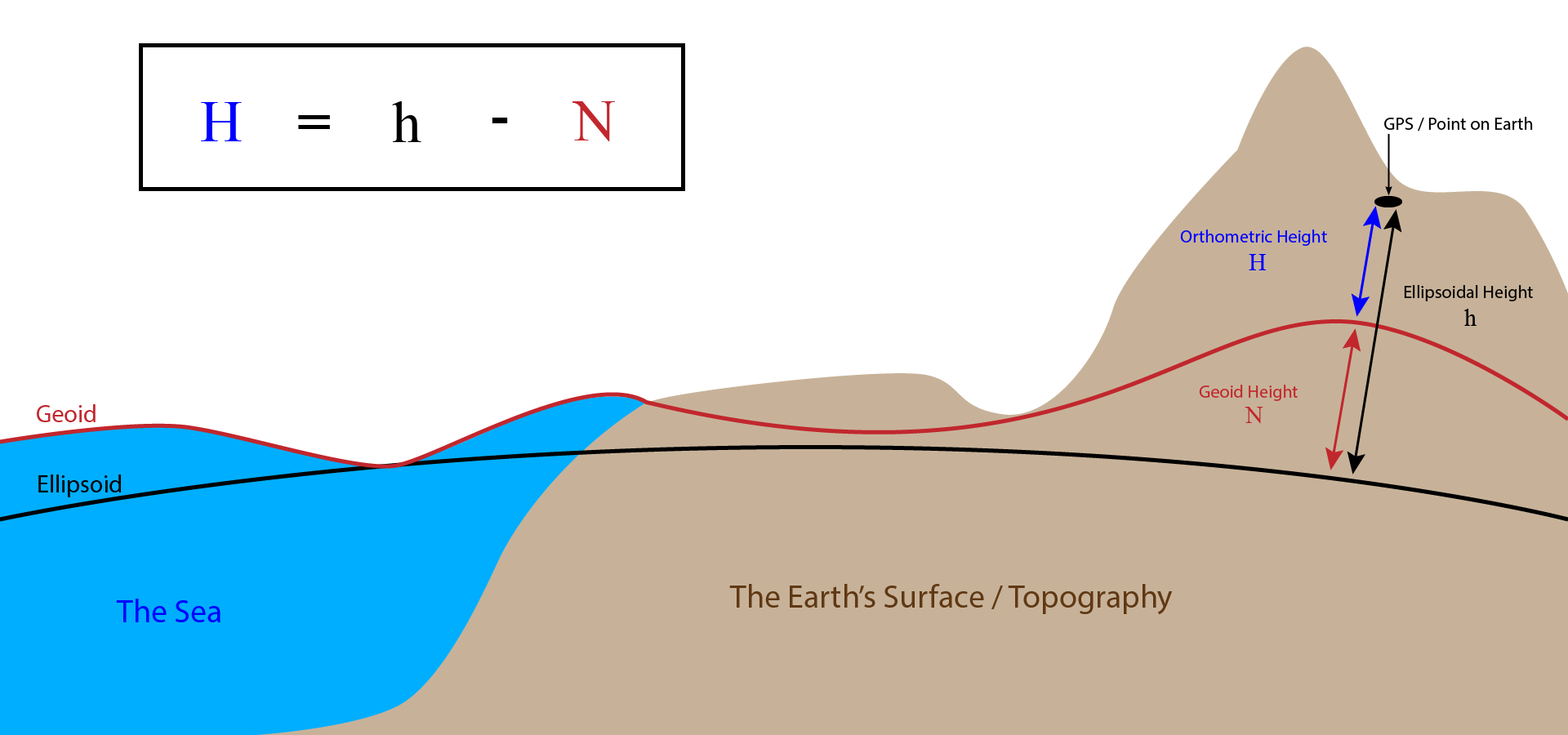
The Ellipsoidal height (h) is the vertical distance between a point on the Earth’s surface and the mathematical ellipsoid used to approximate the Earth’s shape. It is also known as geodetic height. GPS/GNSS receivers measure height relative to this ellipsoid. Because the ellipsoid is a purely mathematical surface and does not represent physical sea level or gravity, ellipsoidal heights are not suitable for engineering or hydrologic applications on their own. A more meaningful elevation reference is orthometric height.
The Orthometric height (H) is the vertical distance between a point on the Earth’s surface and the geoid. The geoid is an irregular, undulating surface derived from the Earth’s gravity field and approximates mean sea level and its theoretical extension beneath the continents. Orthometric height (the elevation we ultimately need) is the elevation used for engineering or hydrology applications because it reflects gravity-based elevation and how water flows across the terrain. Therefore, when elevation is described as “X meters (or feet) above sea level,” it refers to orthometric height. Orthometric height (H) is obtained by applying the Geoid height (N) to the Ellipsoidal height (h): H = h − N.
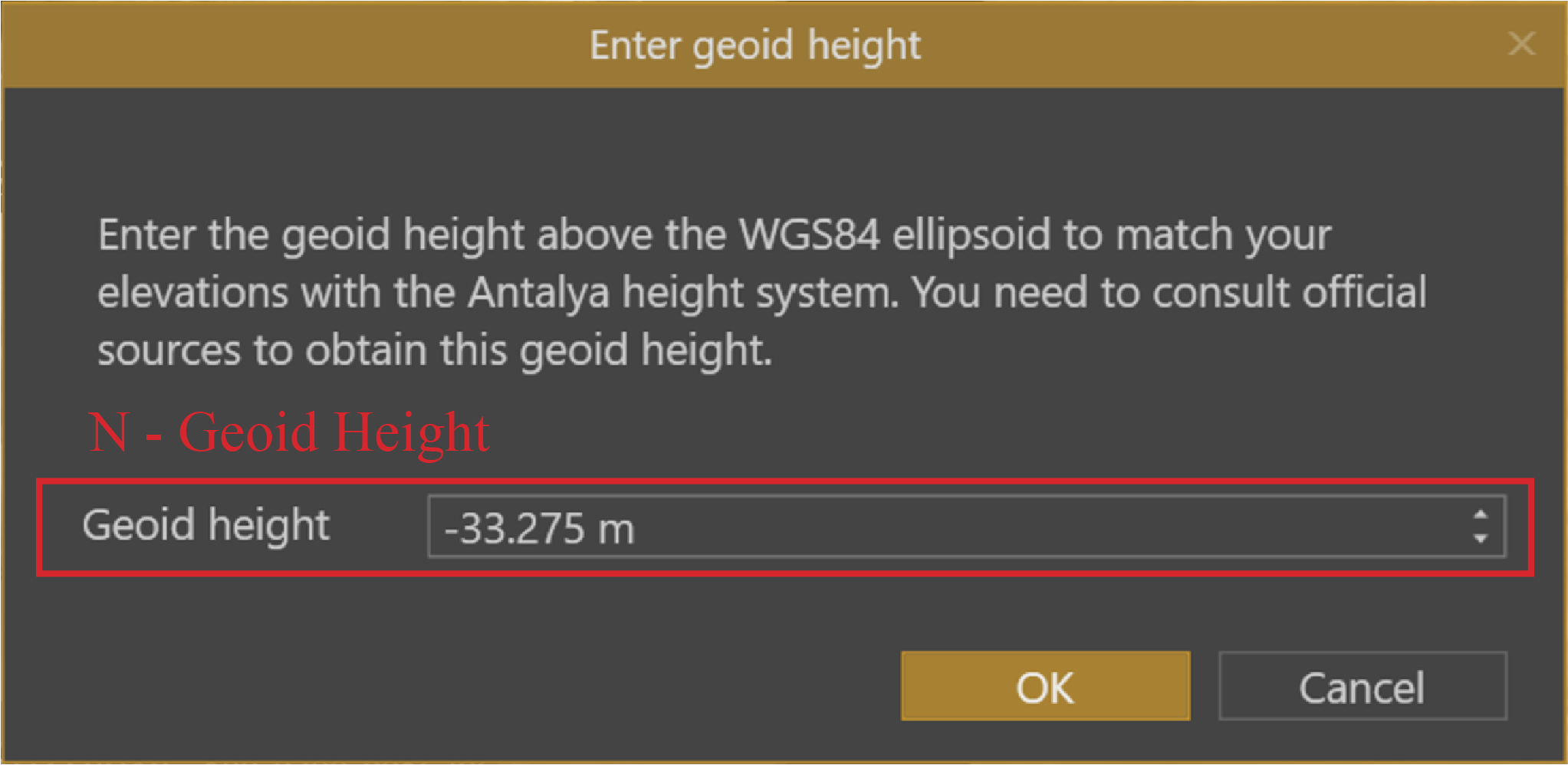
The Geoid height (N) is the vertical separation between the geoid and the reference ellipsoid at a given location. It represents the amount by which the ellipsoid lies above or below the geoid—commonly referred to as the elevation above (or below) Mean Sea Level. This information is required to convert measured ellipsoidal heights into orthometric heights. Geoid height values are derived from geoid models, and the relevant conversions are made available in the TerrainCreator app through a web service. Where no geoid model is available, users can manually enter the geoid height value.
Mean Sea Level and Local Vertical Datums
Mean sea level is not a single, globally uniform surface. Instead, mean sea level is determined locally, typically from long-term tide-gauge observations. Because the ocean surface is influenced by factors such as ocean currents, tides, prevailing winds, water temperature, and salinity, the average sea level differs from place to place.
As a result, each country or region may adopt its own realization of mean sea level as a reference surface. This locally defined mean sea level forms the basis for a local vertical datum, which defines the zero level for orthometric height in a specific area. Local vertical datums are generally parallel to the geoid but are often vertically offset from one another by one or more meters.
For example, Belgium uses Tweede Algemene Waterpassing (TAW) as its local vertical datum, while the adjacent Netherlands uses Nieuw Amsterdams Peil (NAP)—the same point measured in the NAP vertical datum will be 2.33 meters higher than when measured in the TAW datum. This often creates confusion in cross-border projects: even though elevations in both countries are expressed as orthometric heights, they are referencing different local vertical datums, causing the reported elevation values to differ.
Set the Proper Vertical Datum in the TerrainCreator App
The proper elevation reference level (or datum) needs to be set up during the photogrammetry process. Processing the photogrammetry in the TerrainCreator app is a necessary step before you can start your work in the VirtualSurveyor app. Conceptual clarity for setting up the proper vertical datum:
- Ellipsoidal height is what the drone measures.
- Orthometric height is the final elevation you work with in surveying and engineering.
- Geoid height is the correction applied behind the scenes.
Ellipsoidal height in drone photos
When drone photos are captured, their elevation is recorded directly by the onboard GNSS receiver and are included as part of your data in TerrainCreator.
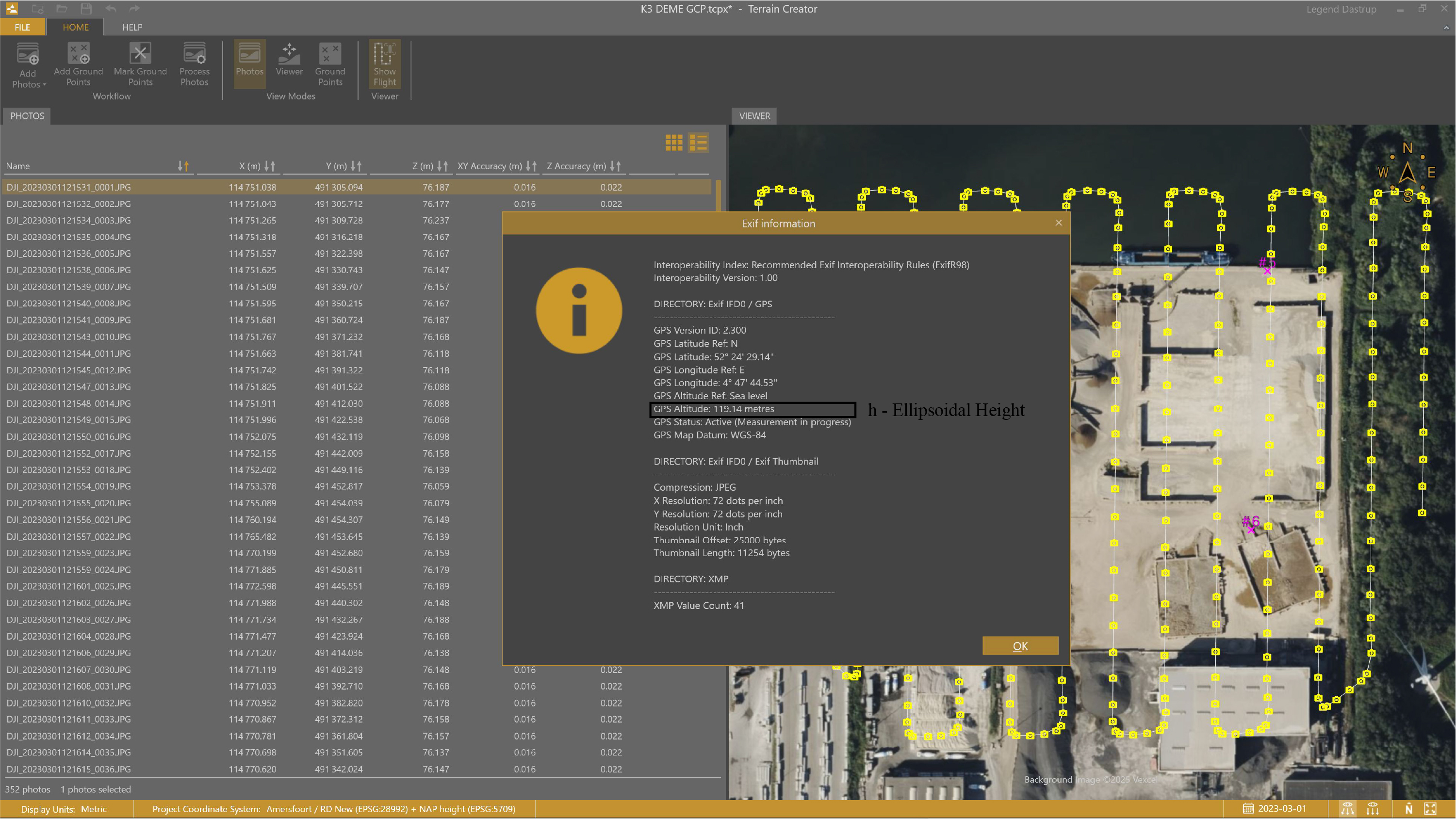
The GPS Altitude shown in the drone photo’s EXIF information is the ellipsoidal height (h). The Exif height elevation shows the original drone photo's ellipsoidal height—which has not been corrected for gravity or sea level—and is not suitable for engineering or surveying use on its own. You can view Exif information of a drone photo by right-clicking on a drone image in the TerrainCreator app.
Processing the orthometric vertical datum with geoid and ellipsoidal elevations
To obtain elevations that reflect real-world gravity and water flow, you must first convert the ellipsoidal elevations to an orthometric height reference.
The images below show two different examples of where the vertical datum is set during processing. By choosing an orthometric vertical datum, the project elevations are converted to heights above the geoid—aka above mean sea level.
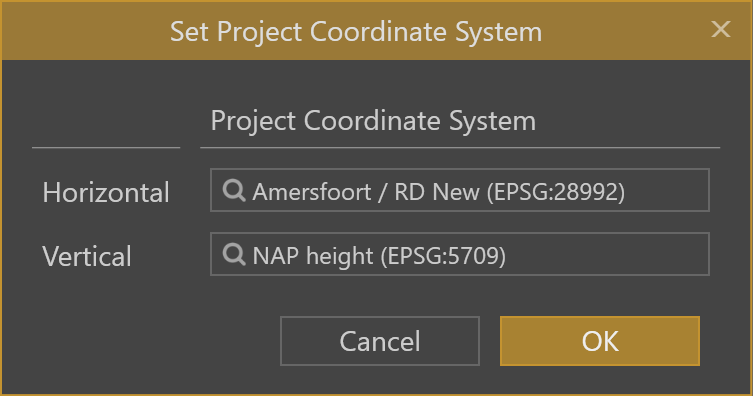
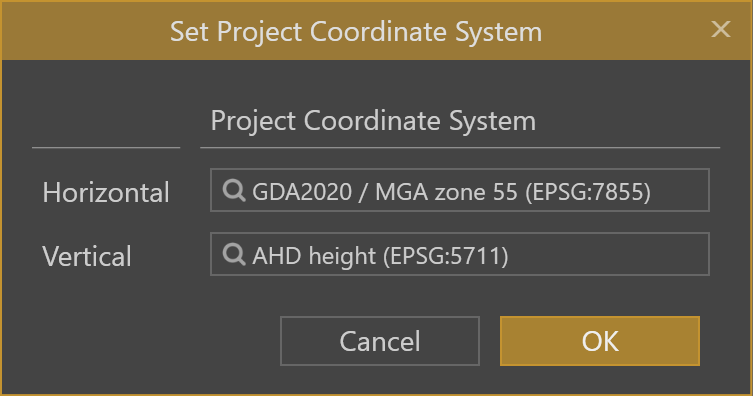
When the drone photos are loaded into the TerrainCreator app, the TerrainCreator app automatically applies the geoid height (N) using an online service to convert ellipsoidal heights into orthometric heights. This geoid correction is what allows GPS-based heights to become usable, gravity-referenced elevations in your project.
Manually enter the geoid heights
If the Geoid height (N) cannot be retrieved through the web services, the TerrainCreator app will ask you to enter the Geoid height (N) manually.
Final orthometric vertical datum
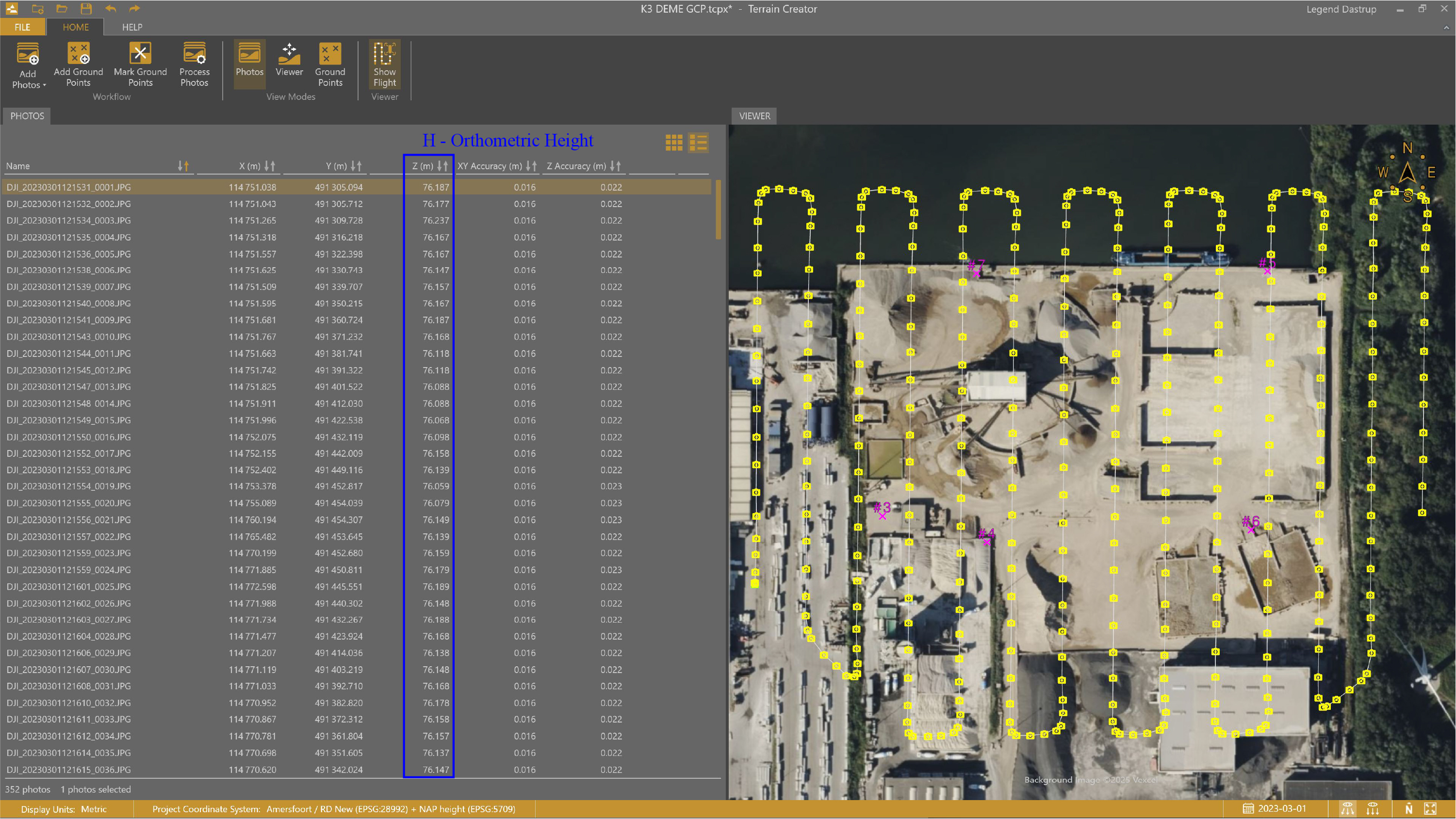
The orthometric height (H) is shown in the "Z" column of the loaded drone photos after they are processed from the geoid and ellipsoidal elevations. This is the elevation you work from when surveying points on a project.
See the complete workflow on how Virtual Surveyor utilizes photogrammetry, along with an entire drone survey workflow.